
Calendly makes scheduling easier. Anvora takes a different approach, connecting private enquiries, services, bookings and conversations for professionals whose work requires more than an appointment.
Booking a meeting used to involve several emails, a few suggested dates and a little patience.
Tools like Calendly have made that process considerably easier. Share a link, let someone choose an available time, and the appointment is scheduled.
But what happens when the person isn't ready to book?
Perhaps they have a confidential question. Perhaps they need to explain their circumstances before deciding which service is appropriate. Or perhaps the appointment is only one part of a professional relationship that will involve forms, payments and ongoing conversations.
That's where the distinction between scheduling a meeting and managing a client engagement becomes important.
Calendly and Anvora approach that distinction differently.

What is Calendly?
Calendly is a scheduling platform that helps individuals and teams coordinate meetings without repeatedly exchanging availability.
Its capabilities extend beyond basic booking links. Depending on the plan and configuration, Calendly supports:
- Calendar integrations and availability management
- Individual and team scheduling
- Booking questions and routing forms
- Automated reminders and follow-ups
- Payment collection through integrations
- Video conferencing integrations
- Contact management and scheduling automations
For professionals whose main challenge is coordinating appointments, Calendly offers a mature scheduling experience.
Its integrations are also an important advantage. A business can connect Calendly with tools it already uses rather than replacing its existing setup.
What is Anvora?
Anvora is a privacy-first platform for professionals and organisations handling sensitive or trust-critical interactions.
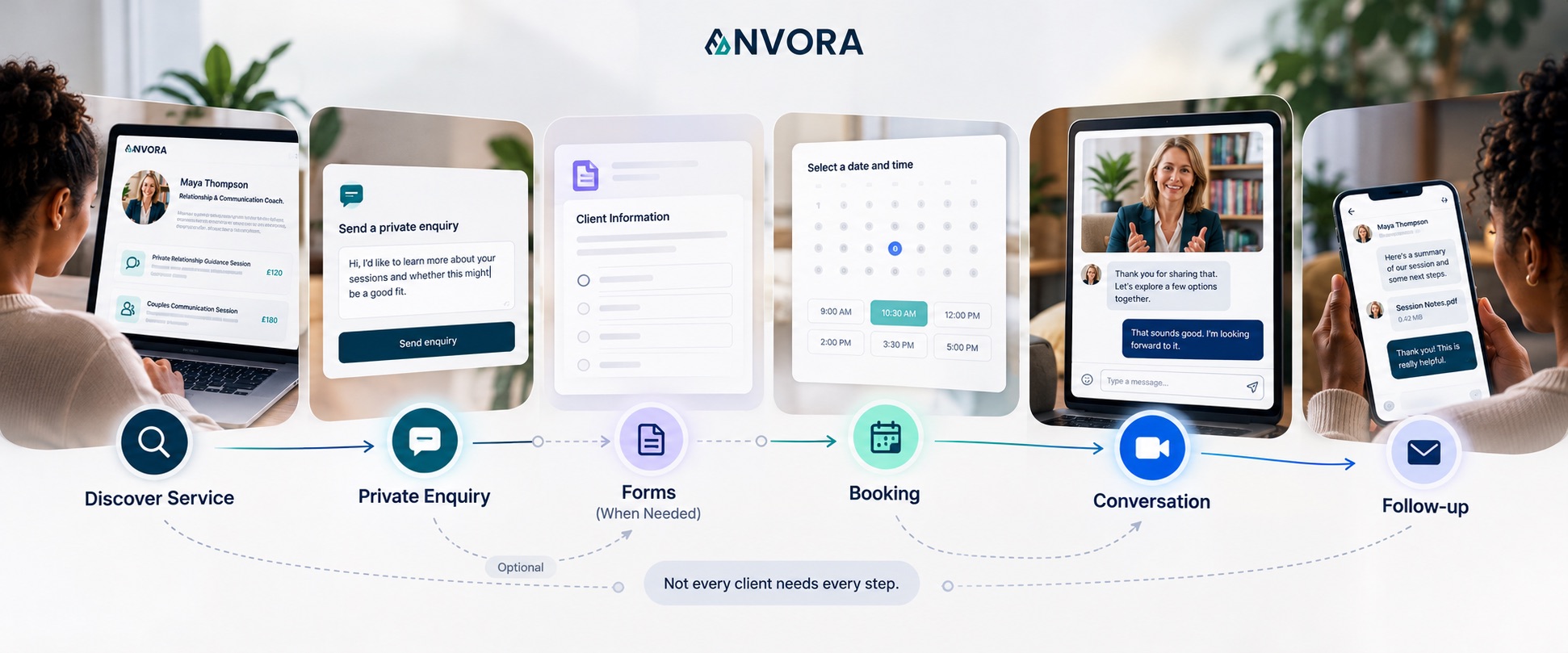
Instead of focusing primarily on arranging meeting times, Anvora connects the different stages of a professional engagement.
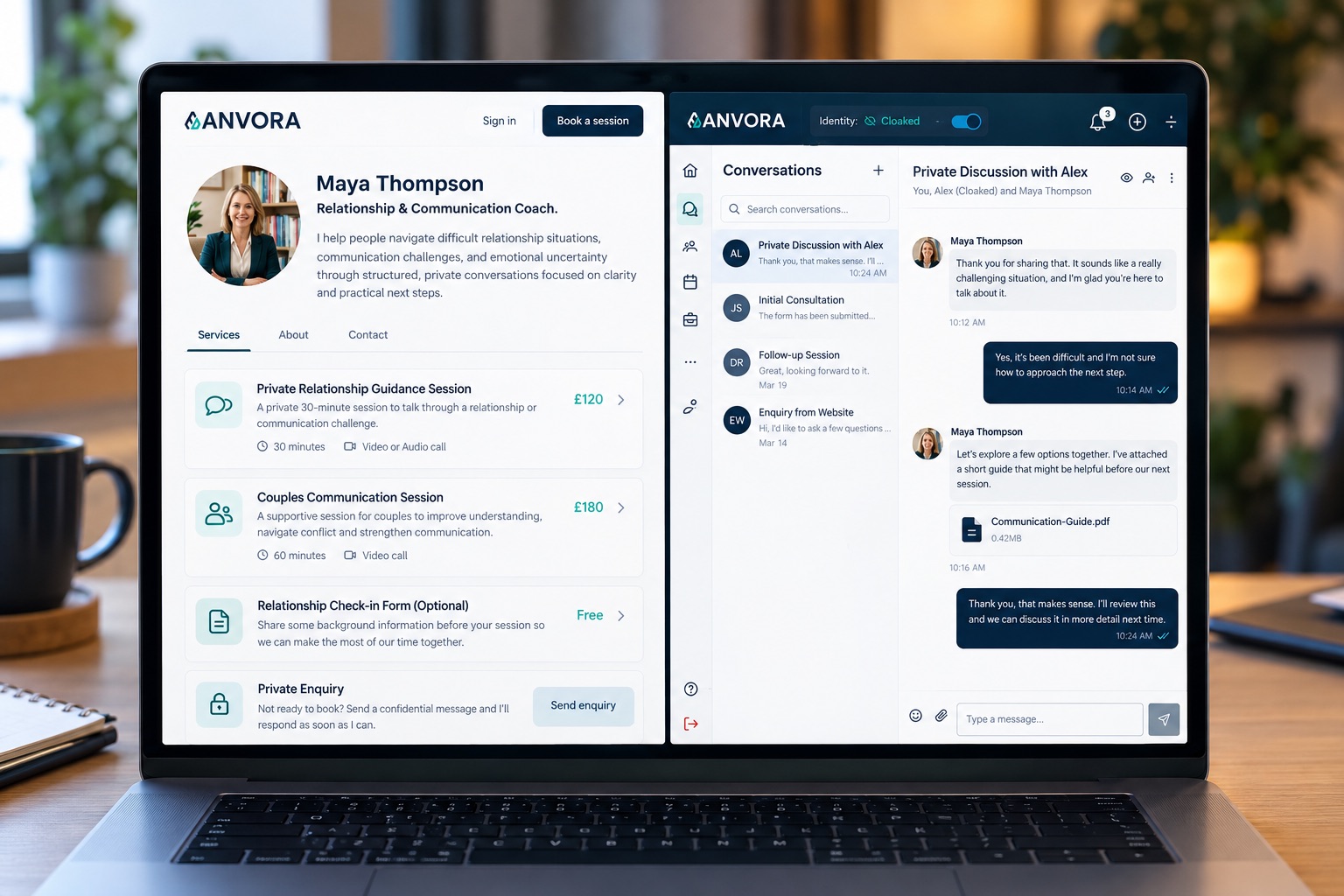
A professional can present services, receive private enquiries, collect information using forms, manage availability and bookings, accept payments where configured, and continue conversations within dedicated sessions.
Anvora also supports identity controls, including pseudonymous participation where appropriate, and voice or video conversations within its supported experience.
The difference is in what each platform treats as the centre of the relationship.
With Calendly, scheduling is central.
With Anvora, the private professional interaction is central, and booking is one part of it.
Calendly vs Anvora: Feature comparison
| Capability | Calendly | Anvora |
|---|---|---|
| Appointment scheduling | Core strength | Supported through services, availability and bookings |
| Calendar integrations | Extensive integrations | Integration availability should be checked for the intended setup |
| Public booking links | Yes | Yes, through public professional or organisation pages |
| Pre-booking questions | Booking questions and routing forms | Private enquiries and custom forms |
| Payments | Supported through payment integrations | Supported through configured payment services |
| Automated reminders | Established scheduling automations | Notification capabilities; automation coverage varies |
| Video meetings | Through conferencing integrations | Voice and video within supported conversations |
| Ongoing client conversations | Contact and communication features, with integrations | Dedicated session-based conversations |
| Pseudonymous participation | Not a central scheduling feature | Identity cloaking where appropriate |
| Participant admission | Meeting access depends on connected tools | Session Join Requests with owner approval |
| Primary emphasis | Scheduling and meeting coordination | Private professional engagement |
Both platforms have capabilities beyond this summary, and availability may depend on plans, configuration and future product updates.
1. Sometimes a client needs a conversation before a booking
Imagine a prospective client visiting a therapist's website.
They have found a service that looks relevant, but they are unsure whether the therapist works with their particular situation.
A booking link gives them a way to schedule an appointment. They may also be able to answer preliminary questions during booking.
But they might not be comfortable committing to an appointment yet.
They want to ask something first.
With Anvora, the therapist can offer a private enquiry route so the prospective client can make contact before booking.
The therapist can respond, clarify expectations and help the person decide whether to proceed.
This distinction also matters outside therapy.
A consultant may need to understand the nature of a confidential project. A mediator may need to establish whether an enquiry is suitable. An advisor may be approached by someone who is not yet comfortable sharing their identity openly.
In these situations, the first interaction is not necessarily an appointment.
It is an opportunity to establish trust.
2. A booking is only one stage of the client relationship
Consider a consultant who offers paid advisory sessions.
A typical setup might involve a scheduling platform, a payment service, an intake form, a video conferencing tool and email.
That arrangement can work well, particularly when the tools are already integrated.
But the consultant still needs to decide where the actual client relationship lives.
Where should the client send a sensitive follow-up question? Where does the information collected before the appointment belong? How should an ongoing discussion remain connected to the engagement?
Anvora offers another approach.
The professional can organise the interaction around a dedicated session rather than treating each appointment as an isolated event.
This allows enquiries, relevant information and conversations to form part of a more connected experience.
3. Privacy can matter before the first meeting
For many professionals, privacy becomes important long before a video call begins.
A prospective client may be discussing a workplace conflict, a personal concern, a confidential business decision or another sensitive situation.
The question is not simply whether a scheduling page is secure.
It is also how much information the person needs to disclose, when they need to disclose it, and who can access the conversation.
Calendly has established security and privacy controls, including encryption, access management and documented data-protection practices. It should not be characterised as an insecure platform.
However, Calendly's own platform security documentation states that its booking pages are not intended for collecting sensitive personal information.
That is an important distinction for professionals designing their intake process.
Anvora is built around private interactions and provides identity controls that can allow participants to use pseudonyms where appropriate.
This can be useful when someone wants to establish contact before revealing more about themselves.
It does not mean identity can always remain concealed. Professional, safeguarding, payment, legal and regulatory obligations may require identification or additional disclosures.
The aim is to make identity disclosure more deliberate, not to eliminate responsibilities that depend on it.
4. Forms should fit the purpose of the interaction
Not every client needs to complete a detailed form before speaking to a professional.
Sometimes a short question is enough.
In other situations, collecting structured information is essential.
Calendly supports booking questions and routing forms that help organise scheduling and direct people towards appropriate meetings.
Anvora Forms supports a different part of the experience: collecting information within a professional engagement.
For example, a coach might use a form to understand a client's goals before a session. A consultant might request project background information. A therapist might collect relevant intake information, subject to their professional and data-protection requirements.
The key question is whether the form is primarily helping someone book a meeting or supporting the work that happens around the engagement.
For a closer comparison of form-based intake tools, read Anvora Forms vs Google Forms for Sensitive Client Intake.
5. What happens after the appointment?
An appointment may end after thirty minutes, but the professional relationship often continues.
A client may need clarification. A consultant may have further recommendations. A coach may want to revisit a topic discussed during the session.
Calendly offers reminders, follow-up automations, contact features and integrations that support communication around meetings.
Anvora places greater emphasis on conversations taking place within the engagement itself.
Its session-based approach allows participants to continue communicating in a dedicated space. Where enabled, voice and video are available as part of that experience.
For professionals handling repeated or sensitive interactions, this can reduce the need to move between unrelated communication channels.
That doesn't automatically make Anvora the better choice. It depends on whether ongoing private conversations are central to the service being delivered.
When Calendly is the better choice
Calendly may be the stronger option when:
- Scheduling efficiency is the main requirement
- Calendar synchronisation and integrations are essential
- A team needs established routing or round-robin scheduling
- Meetings take place through existing conferencing tools
- The organisation already has suitable systems for client records and communication
- Clients generally know what they want and are ready to book
There is little reason to replace an effective scheduling setup if the rest of the client experience is already working well.
When Anvora may be the better choice
Anvora becomes worth considering when:
- Prospective clients need a private way to make contact before booking
- The professional offers services that require trust and discretion
- Intake forms need to support the wider engagement
- Clients and professionals benefit from dedicated ongoing conversations
- Identity disclosure needs to be handled thoughtfully
- Services, payments, bookings and conversations should feel more connected
- A professional wants a public service page that leads into a private interaction
Anvora may be particularly relevant to therapists, coaches, mediators, consultants, advisors and organisations handling sensitive enquiries.
A practical example: a private advisory consultation
Consider an independent advisor offering consultations to clients dealing with sensitive business decisions.
With a scheduling-first approach, a visitor selects a service, chooses an available time and completes the booking. The advisor may then use other connected tools to collect information and communicate.
That can be an efficient arrangement.
With Anvora, the visitor can take a different route.
They might first explore the advisor's services and send a private enquiry. The advisor can respond before the visitor decides whether to book.
If more information is needed, the advisor can use a form. The visitor can then book an appropriate service and continue the discussion through a dedicated session.
The benefit is not simply fewer tools.
It is the ability to give the client a clearer path from initial uncertainty to an ongoing professional interaction.
Can you use Calendly and Anvora together?
Potentially, yes.
These products are not necessarily mutually exclusive.
A professional might prefer Calendly for its established scheduling integrations while using Anvora for particular private interactions.
However, that should not be mistaken for a claim that the two platforms currently offer a native integration or automatically synchronise bookings.
Anyone considering a combined setup should verify the available integration options and determine how information moves between systems.
The right combination is the one that meets the professional's practical, privacy and operational requirements without introducing unnecessary complexity.
Frequently asked questions
Is Anvora a Calendly alternative?
Anvora can be an alternative for professionals who want booking capabilities within a broader private client engagement platform.
It is not a like-for-like replacement for every Calendly scheduling, automation or integration feature.
Can I accept payments through Anvora?
Yes. Anvora supports payments for configured professional services. Availability and payment setup depend on the relevant account and supported payment configuration.
Can clients contact me before booking?
Yes. Anvora supports private enquiries, allowing prospective clients to make contact before deciding whether to book.
Does Calendly support forms?
Yes. Calendly supports booking questions and routing forms.
Anvora Forms focuses on collecting information as part of a broader professional interaction. The better option depends on what the form needs to accomplish.
Is Anvora only for therapists and coaches?
No. Anvora is designed for professionals and organisations handling trust-critical interactions, including consultants, advisors, mediators and support services.
Does Anvora replace Zoom or Google Meet?
Anvora supports voice and video conversations within its platform where enabled.
Whether it can replace an existing conferencing setup depends on the features, integrations and meeting requirements involved.
For a more detailed discussion, see Anvora vs Zoom for Client Conversations.
Which is better for sensitive client information?
That depends on the type of information, the purpose of collection, the platform configuration and the professional's legal obligations.
Calendly provides established security protections but states that its booking pages are not intended for collecting sensitive personal information.
Anvora is designed for private professional interactions, but professionals must still assess whether their intended use meets applicable confidentiality, safeguarding and data-protection requirements.
The bottom line
Calendly is a strong choice when the problem you need to solve is scheduling.
Anvora approaches a different, often broader question: what should happen around the appointment when the relationship involves sensitive information, private enquiries and ongoing conversations?
For some professionals, a scheduling link is all they need.
For others, the booking is just one moment in a relationship that begins with trust and continues through a series of interactions.
The better choice depends on whether you're primarily managing meetings or managing the experience around them.
Explore a more private way to work with clients
If your professional services involve more than scheduling appointments, Anvora offers a way to bring private enquiries, forms, bookings and conversations into a connected experience.
Explore Anvora and start your 14-day free trial
No payment card required to start your trial.
Comparison information reflects publicly documented Calendly capabilities as reviewed in October 2026. Features and plan availability may change. Anvora is an independent product and is not affiliated with Calendly.